See every customer at a glance
MSPs see every customer they manage in one dashboard, with connection status and assessment results for each.
For managed service providers
Run the same 11 read-only checks across your customers’ tenants, see each customer’s status at a glance, and give each technician access to exactly the customers they look after.
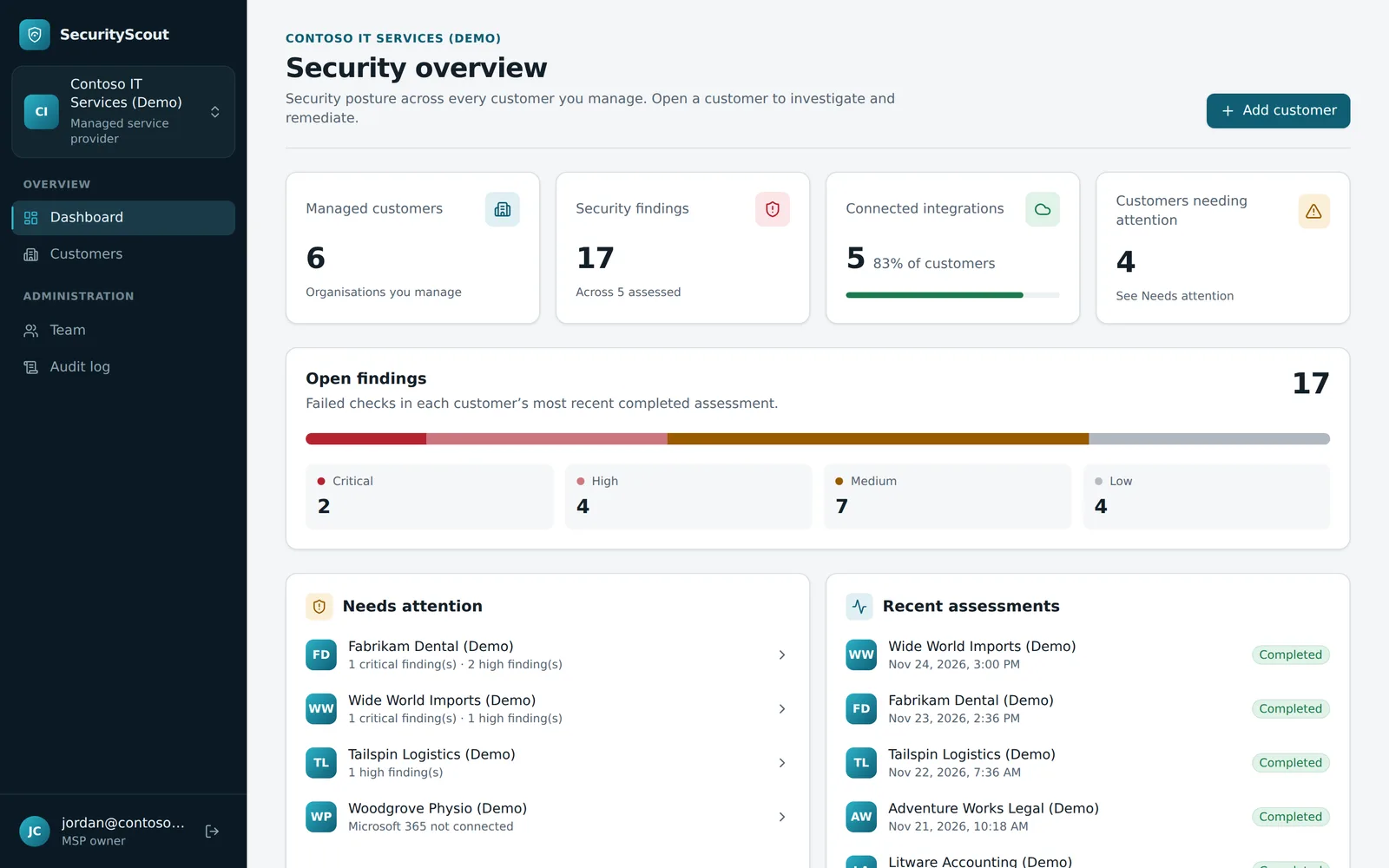
MSPs see every customer they manage in one dashboard, with connection status and assessment results for each.
MSPs can set up a new customer organisation and hand ownership to the customer, or link an existing SecurityScout customer with a one-time approval code.
Technicians see only the customers they are assigned to. New staff get no customer access until an administrator grants it.
An MSP can manage an existing customer only after that customer’s owner approves the link. Customers keep ownership of their organisation. A managing MSP cannot remove or demote the customer’s owner.
Built for shared responsibility
While a customer is linked to you, your staff can work in it according to their role, and the customer’s own users cannot reduce that access.
A customer can end its MSP’s access at any time. The MSP loses access immediately and the customer keeps its data.
Suspending a staff member or removing their customer access takes effect on their very next request.
Staff, access and Microsoft 365 connection changes are recorded in an audit log that the application can add to but never change or delete.
Request partner access. We set up your partner organisation with you; then you invite your team and add your customers.