Skip to content
SecurityScout
Menu

Microsoft 365 security assessment

The 11 checks, and why each one matters.

Every check below runs against your tenant through read-only Microsoft Graph permissions. Each finding explains what was found, the risk, and how to fix it, with a link to Microsoft’s own guidance.

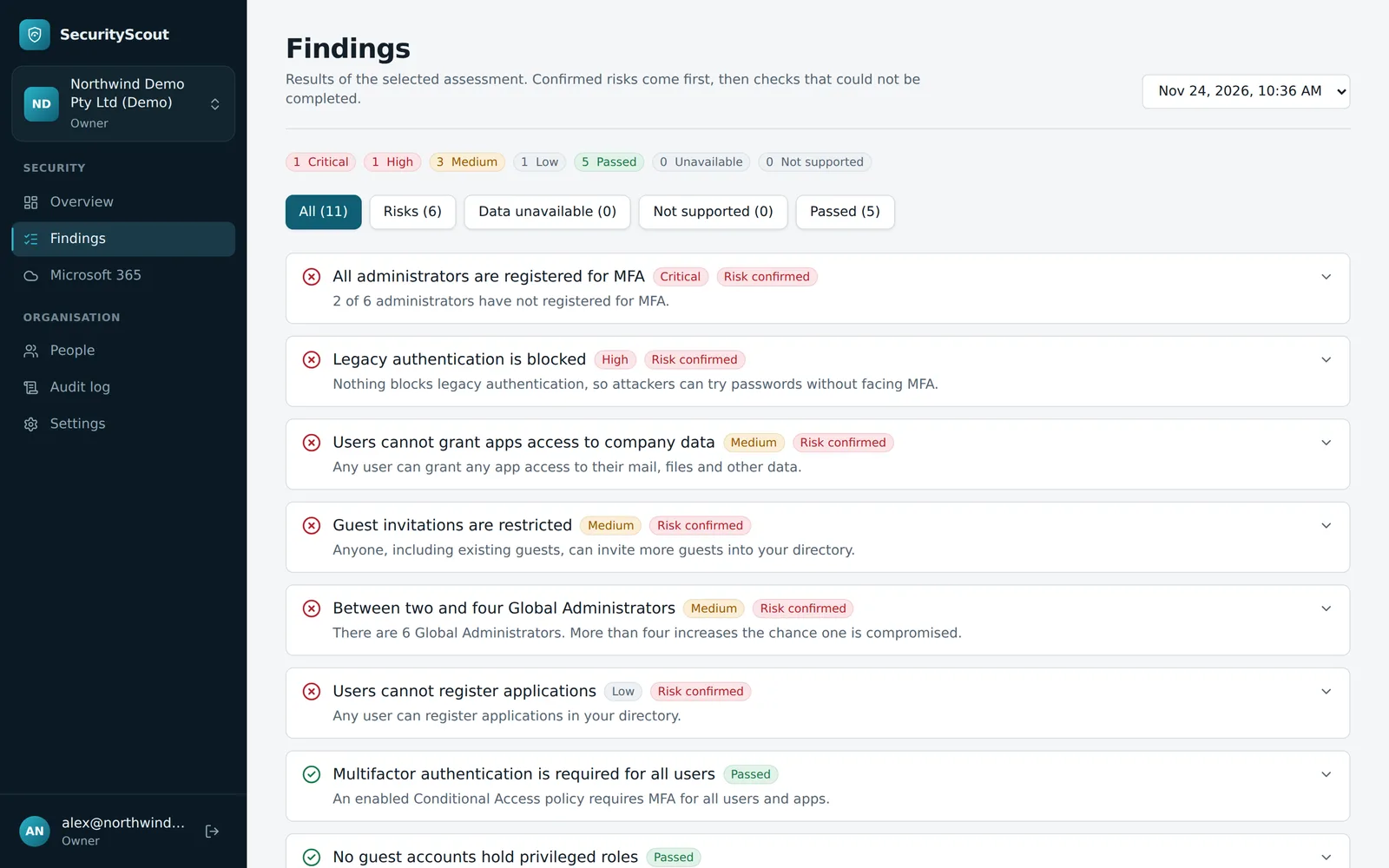
SecurityScout Microsoft 365 findings for a demo organisation, with counts by severity and passed checks

What a result means

Every check reports one of four results: a confirmed risk, a pass, data that was unavailable, or a check that does not apply to your licence.

Some checks need data that Microsoft only provides with Microsoft Entra ID P1 or P2. Without that licence, SecurityScout marks the check as not applicable instead of guessing.

Identity

M365-IDN-001high

Multifactor authentication is required for all users

What SecurityScout checks
Whether security defaults are on, or an enabled Conditional Access policy requires MFA for every user and every app. A policy left in report-only mode does not count.
Why it matters
Without enforced MFA, one phished or reused password is enough to sign in as that person, from anywhere.
How to fix it
Turn on security defaults, or (with Entra ID P1) create a Conditional Access policy that requires MFA for all users and all cloud apps, excluding only emergency access accounts.
M365-IDN-002high

Legacy authentication is blocked

What SecurityScout checks
Whether security defaults or an enabled Conditional Access policy blocks legacy sign-in protocols (Exchange ActiveSync and other older clients) for all users.
Why it matters
Legacy protocols cannot ask for MFA, so attackers use them to try stolen passwords even where MFA is required.
How to fix it
Block legacy authentication protocols (which cannot do MFA) with security defaults, or a Conditional Access policy that blocks the "Exchange ActiveSync" and "Other clients" client app types for all users.
M365-IDN-003medium

Between two and four Global Administrators

What SecurityScout checks
How many accounts hold the Global Administrator role.
Why it matters
Too many Global Administrators multiplies the accounts that can take over the whole tenant. Too few leaves you locked out if one account is lost.
How to fix it
Keep at least two Global Administrators (one an emergency access account) and no more than four. Give other administrators the least-privileged role that does their job.
M365-IDN-004high

No guest accounts hold privileged roles

What SecurityScout checks
Whether any guest (external) account holds a privileged directory role.
Why it matters
Guest accounts are protected by another organisation’s security, not yours. Admin rights should never depend on it.
How to fix it
Remove privileged roles from guest accounts. Administrators should use accounts in your own directory that your policies protect.
M365-IDN-005critical

All administrators are registered for MFA

What SecurityScout checks
Whether every administrator has registered a multifactor authentication method.
Why it matters
An administrator without an MFA method cannot be challenged for one. Admin accounts are the first target in most tenant takeovers.
How to fix it
Make every administrator register a strong MFA method (ideally phishing-resistant) before they next sign in, and require MFA for all admin roles.
M365-IDN-006medium

At least 90% of members are registered for MFA

What SecurityScout checks
What share of member accounts have registered for MFA, against a 90% threshold.
Why it matters
Unregistered users cannot complete MFA, so they are left out of protection or, worse, an attacker registers first.
How to fix it
Run an MFA registration campaign and require registration at next sign-in, so every user can be challenged for MFA.

Applications

M365-APP-002low

Users cannot register applications

What SecurityScout checks
Whether any user can register new applications in your directory.
Why it matters
Unrestricted app registration lets anyone create identities that can request access to your data.
How to fix it
Set "Users can register applications" to No and give the Application Developer role to people who need it.
M365-APP-003medium

Third-party apps with access to mail, files or directory data

What SecurityScout checks
Which third-party apps already hold permissions to mail, files or directory data, and whether those permissions cover the whole organisation.
Why it matters
Apps keep their access after the person who approved them forgets about them. AI tools and browser extensions are common examples.
How to fix it
Review each app. Remove apps nobody approved (including AI assistants and browser extensions), and keep only those with a business owner. Prefer verified publishers.

External access

M365-GST-001medium

Guest invitations are restricted

What SecurityScout checks
Who is allowed to invite guests into your tenant.
Why it matters
If anyone can invite guests, external access grows without anyone deciding it should.
How to fix it
Allow only administrators and users in the Guest Inviter role (or at least only members) to invite guests.
M365-GST-002low

No inactive guest accounts

What SecurityScout checks
Which guest accounts have not signed in for 90 days or more.
Why it matters
Forgotten guest accounts keep their access long after a project ends, and nobody notices if they are misused.
How to fix it
Remove guests who have not signed in for 90 days, and use access reviews to keep guest access current.

Find out where your Microsoft 365 stands.

Connect with read-only access and run your first assessment. Your tenant settings are never changed.